
By the Comecinc Legal Directives Compliance Team | Reviewed and Published: 1 May 2026
Litigation in the Gauteng Division Is Now Digital-First

South Africa’s Gauteng Division has entered a decisive new chapter. As of 2026, litigation is no longer simply moving towards digital; it is digital.
The two manadatory platforms are:CoutrOnlie and CaselLines, while governing instruments that define how practitioners and self-represented litigants must operate are the Revised Consolidated Practice Directive 1 of 2024 (amended 12 June 2024) and the Directive on Indexing and Pagination dated 1 December 2025 (issued by DJP Sutherland). Together, they set a markedly higher standard for electronic court bundles, one focused on coherence, practical navigation, and efficient reading for judges.
The December 2025 Directive represents a significant shift: compliance is no longer about simply numbering pages. It demands accuracy, meaningful document descriptions, and formal certification. This is the first installment of a three-part series. It covers:
(1) How CourtOnline and CaseLines work and how they differ
(2) Practical strategies for turning compliance into competitive advantage.
(3) Step-by-step guidance on linking your profiles, syncing documents, and accessing bundles.
(4) The key compliance requirements under the 2024 and 2025 Directives
(5) The consequences of non-compliance.
(6) Practical strategies for turning compliance into competitive advantage
Whether you are a practicing attorney adapting to the new system or a self-represented litigant navigating it for the first time, this guide is designed to keep you from being struck off the roll.
1. CourtOnline and CaseLines: Gauteng Division’s Two Mandatory Digital Platforms
The Gauteng Division operates through two integrated but functionally distinct platforms. Understanding each system’s role is the first and most important step to compliance.

CourtOnline: The Filing and Case Management Portal
CourtOnline is your primary gateway for initiating new matters, filing pleadings and applications, and requesting hearing dates. All new cases must be opened here (or via CaseLines’ Case Centre, albeit with an important caveat below).
CaseLines: The Evidence Management Platform
CaseLines is where the judge lives. Once a matter is enrolled, this is the platform on which bundles are created, evidence is organised, orders are issued, and case files are reviewed. Although CaseLines now features a Case Centre through which cases can be opened, cases initiated there are not issued with the required case reference or case number. For proper case registration, CourtOnline remains the authoritative starting point.
Failure to use the correct system for its designated purpose can — and does — result in matters being struck from the roll.
For official guidance, both practitioners and self-represented litigants can consult the Judiciary CourtOnline portal and SA Justice CaseLines.
CourtOnline, CaseLines, and Self-Represented Litigants
Earlier directives suggested that self-represented litigants were partially exempt from digital filing requirements. That exemption no longer exists.
The 2026 Directive applies “in all cases of whatever nature.” CourtOnline and CaseLines are now mandatory gateways to compliance for attorneys and respondents in person alike.
If you are a self-represented litigant, the distinction to keep in mind is that CourtOnline is your front-end filing portal. This is where you submit your documents.
CaseLines is the back-end evidence management system where you organise the bundle for the judge.
Both platforms require separate registration. Both are now required.
Dual Profile Management: The Email Alignment Rule
Although the two systems are linked at certain points, they require separate registration and separate profile management. A practitioner or litigant must register independently on each platform.
The single most common and most avoidable technical problem arises here. Instead of using the same email address for both CourtOnline and CaseLines, some users use different email addresses.
Unfortunately, when credentials do not match, cases “disappear” from your dashboard, notifications fail to arrive, and bundle access is disrupted.
Best practice is therefore to use the same email address for both platforms. This ensures seamless case linking, unified notifications, and uninterrupted bundle access.
2. CourtOnline: Linking Your Profile and Syncing Case Access
If You Initiated the Case
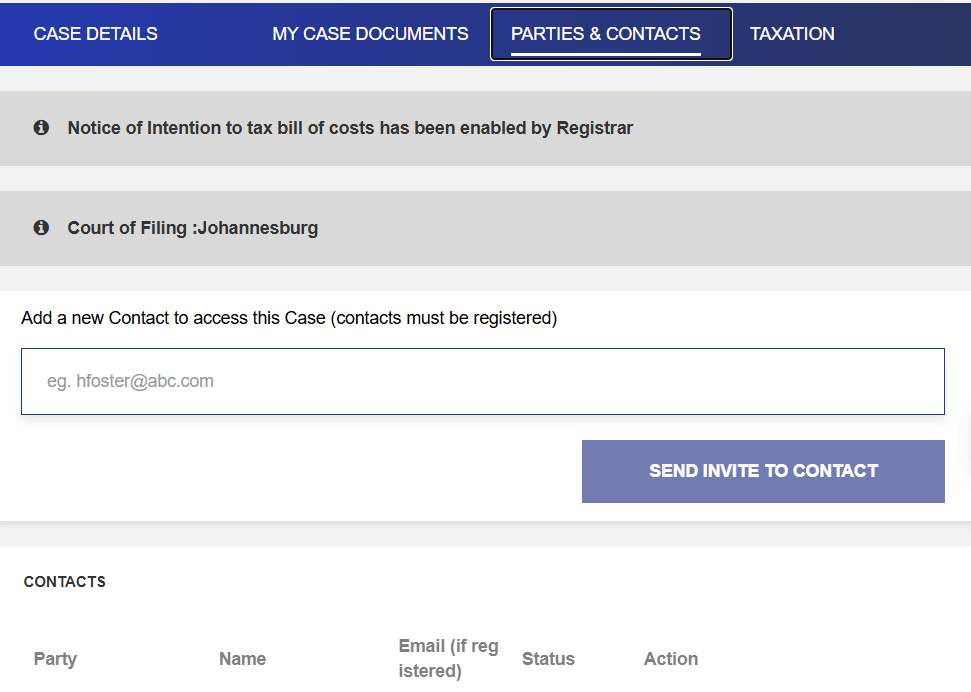
If you opened the case, your account should already have access. To invite a co-litigant or sync a specific email address as a party, follow these steps:
1. Log in to CourtOnline.
2. Navigate to “My Cases” and select your case.
3. Open the “Parties & Contacts” tab.
4. Enter the relevant email address (the same one used for CaseLines) and click “Send Invite to Contact.”
5. The person will now appear under “Full Access”, and the case will reflect under their Active Cases.
However, for this to happen, the invitee MUST have a profile on CourtOnline.
If You Did Not Initiate the Case
If the case does not appear in your “My Cases” list:
1. Click “Access a Case” on the main dashboard.
2. Enter the full case number (e.g., 2024/12345).
3. Upload a supporting PDF (e.g., an identity document or a formal access request letter) for a court official to review.
4. A court official must approve the request before the case becomes visible in your profile.
3. Registering on CaseLines as a Self-Represented Litigant
It is important here to point out that respondents in person do not require a Legal Practice Council (LPC) number to use CaseLines. However, do note that having a CourtOnline account does not automatically create a CaseLines account. You must register on each system separately.
How to register on CaseLines
– Go to sajustice.caselines.com
– Use the same email address as you did to open your CourtOnline account.
– Click “REGISTER,” complete your details, and verify your email (check your spam folder if the link does not arrive).
Registering with a matching email address also allows you to view your bundle, update generic “Annexure A” labels to specific document descriptions, and upload your 2026 Certificate of Compliance—all of which are required under the December 2025 Directive.
Once registered, ensure you have been invited to the specific case on both platforms. If you have not received an invitation, contact the applicant’s attorney or the registrar without delay. In some cases, self-represented litigants must wait until the matter is set down, that is, given a court date, before they can access a particular case in CaseLines.
4. Accessing CaseLines from CourtOnline — The One-Way Restriction
While CaseLines can be accessed from within CourtOnline, documents added directly to CaseLines for a CourtOnline-initiated case will not be visible to the judge. The reverse does not apply to cases managed natively within CaseLines, that is, if invitations and file sharing have been properly activated.
A common misconception among practitioners is that filing on CourtOnline automatically gives the judge access to a file. It does not.
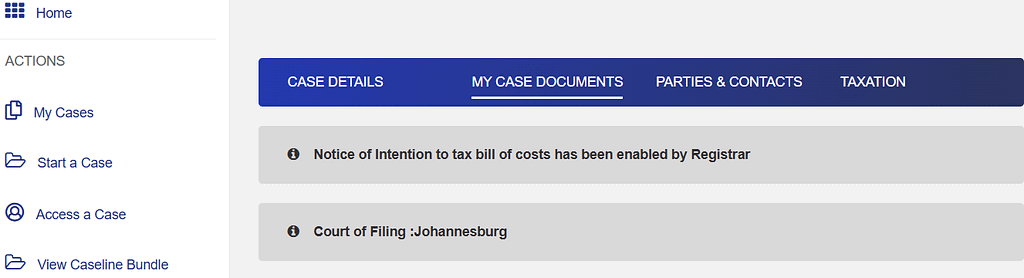
In 2026, linking your CourtOnline profile to your CaseLines bundle is a manual process. Here is how it works:
Step-by-Step: Syncing Documents for the Judge
Step 1 — Bundle Creation
Once a hearing date is assigned, a “View Bundle” (or “View CaseLines Bundle”) button appears in CourtOnline. Clicking it opens the CaseLines interface in a separate window.
Step 2 — Manual Document Syncing
Documents filed on CourtOnline do not transfer to CaseLines automatically. To add them to the judge’s bundle:
Click “Add Selection to Bundle.”
Under “My Case Documents,” click the yellow bundle button next to your scheduled hearing date. Tick the checkbox next to each document you want the judge to see. Select the appropriate bundle section from the dropdown (e.g., “Pleadings” or “Affidavits”). Click “Add Selection to Bundle.”
Step 3 — Verification
Click “View Bundle” to open CaseLines and confirm that your documents appear with their red pagination numbers.
Both platforms send automated email notifications to all parties whenever a document is uploaded or edited.
If your cases do not sync within 24 hours, contact the helpdesk at 010 493 2600 or email CourtOnlineSupport@judiciary.org.za for more information and technical support.
5. Compliance Standards: What the 2024 and 2025 Directives Require
The primary governing framework for Gauteng Division court operations in 2026 consists of:
The Revised Consolidated Practice Directive 1 of 2024** (effective 26 February 2024, amended 12 June 2024) and The Directive on Indexing and Pagination dated 1 December 2025.
Together, they introduce the following mandatory requirements:
5.1 Mandatory Digital Filing
Applications for default judgment under Rule 31(5) must be uploaded via CourtOnline.
5.2 Operating Hours for Electronic Filing
Filings must be submitted on court days within the following windows to be deemed filed on that day:
> Mornings: 09:00 – 13:00 > Afternoons: 14:00 – 15:00
Filings submitted outside these windows are recorded as filed on the following court day.
5.3 Default Judgment Procedure
Attorneys must approach the Registrar first for default judgments under Rule 31(5). Approaching the open court directly, without first utilising the registrar, requires demonstrating good cause.
5.4 Registrar Queries
Where the Registrar identifies defects or discrepancies, a rejection notice or query sheet is issued via the electronic system. The matter must be rectified and resubmitted before it can proceed.
5.5 National Credit Act (NCA) Matters
Default judgments involving the NCA must be disposed of by the Registrar (except those involving residential property), who refers compliant matters to a judge in chambers when they are ripe for an order.
5.6 Practice Notes
A practice note must be uploaded between 5 and 7 court days before any scheduled hearing, using the templates provided in the Directive’s annexures.
5.7 Certification of Bundle Compliance
Must be uploaded, no later than two court days after uploading a bundle, practitioners must provide a certificate confirming that the bundle complies with the naming, formatting, and indexing standards prescribed by the December 2025 Directive. This certification requirement applies to both new and updated bundles.
5.8 Mandatory Mediation (Effective April 2025)
For all civil trials set down in 2026, a mediator’s report must accompany the trial practice note at least 7 court days before the trial date. Failure to present this report results in the matter being struck from the roll.
5.9 Strict Indexing and Pagination (Effective Term 1, 2026)
All matters, regardless of page count, must be consecutively indexed and paginated. For files exceeding 250 pages, documents must be divided into bundles, each with a consolidated index.
6. Naming and Labelling Standards: The End of “Annexure A”
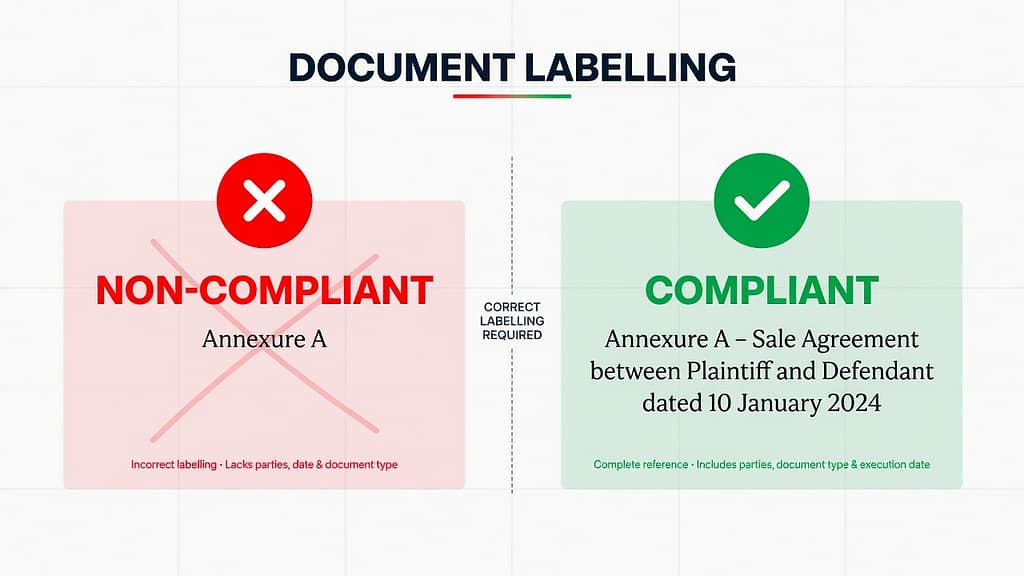
The December 2025 Directive prohibits generic document labels. Every document must carry a specific, descriptive label — both on the physical document and as its digital file name on CaseLines and CourtOnline.
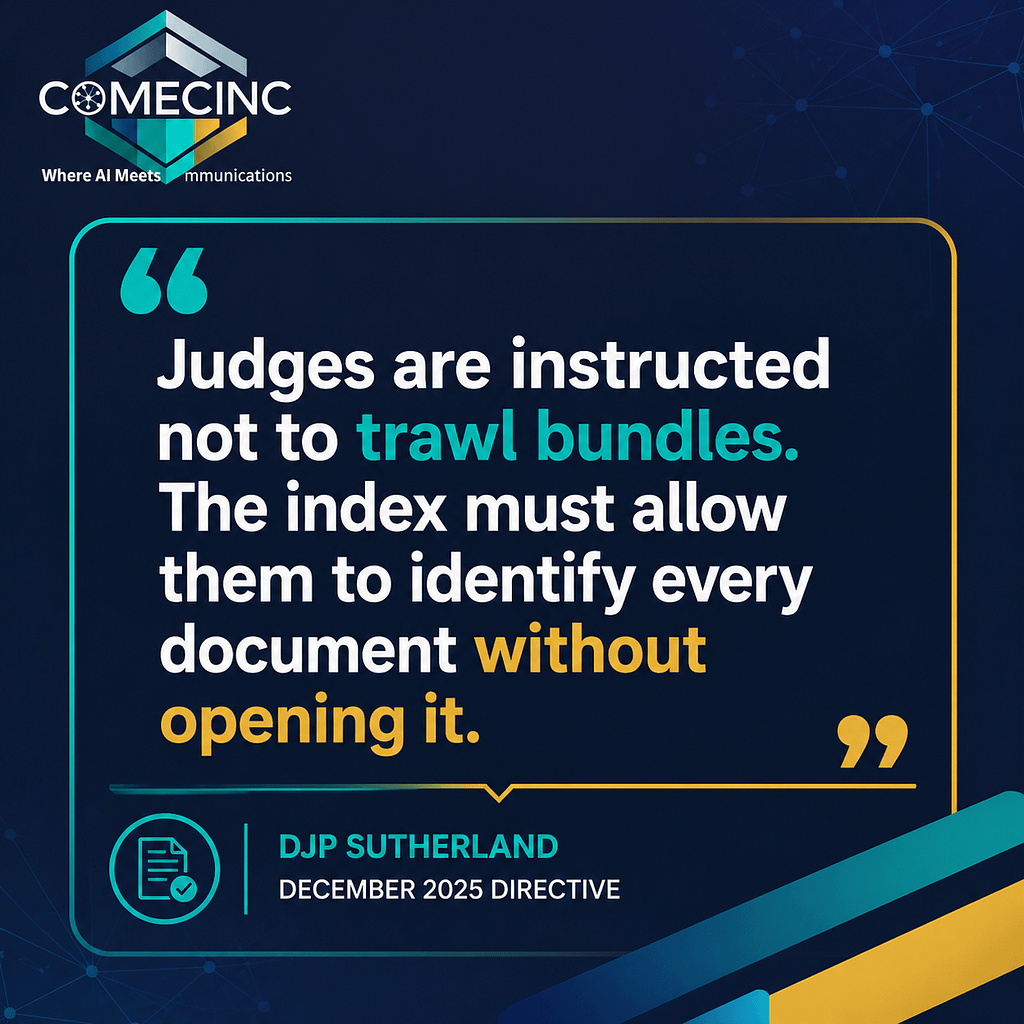
This is because “judges are now instructed not to trawl bundles.” The automated index generated by the system must allow a judge to identify every document by name, without opening it.
Below are further examples of what is considered compliant and non-compliant.
Non-compliant: – Annexure A
Compliant: – Annexure A – Sale Agreement between Plaintiff and Defendant dated 10 January 2024
– Annexure B – Letter of Demand from Smith Inc Attorneys dated 15 February 2024
A compliant label identifies the document’s nature, date, and relevance. It must appear as the system label (file name) visible in the automated index, not merely in a header on the printed page.
7. Risks and Consequences of Non-Compliance
Non-compliance under the 2026 Directives carries serious procedural and financial consequences:
Risk Consequence
Generic labels or missing descriptions Registrar query or rejection
No Certificate of Compliance Matter is not processed or enrolled
Missing mediation report Struck from the roll with punitive costs
Filing outside operating hours Deemed filed the following court day
Late or missing practice note Automatic removal from roll; date forfeited
Legacy bundles not updated Matter at high risk of strike with costs
Retroactive Enforcement
Cases initiated or filed before 1 December 2025 are not exempt. Any matter still before the courts in 2026 must be updated to meet current standards before it is heard.
After updating a legacy bundle, a Certificate of Compliance must be uploaded within two court days of the update. If the update involves adding a substantive pleading, such as an affidavit, rather than simply renaming a file, it must also be served on the other party in accordance with the Uniform Rules (typically by email or via the portal).
Registrars are instructed not to enrol any matter that does not meet the current prescripts. Judges will not hear a matter whose bundle is not, in the language of the Directives, “ripe for hearing”.
8. Turning Compliance into Strategy

While for some, compliance is considered a burden, it can be a blessing, especially if turned into strategy. On the contrary, compliance should not be treated as an administrative burden. Approached strategically, it becomes a professional differentiator. This is particularly as it:
Streamlines workflows: Proper indexing and consistent labelling reduce preparation time, limit back-and-forth with registrars, and make case files easier for your own team to navigate.
Enhanced credibility: A well-organised, fully compliant bundle signals professionalism to the bench. Judges and registrars notice and take note.
Future-proof practice: Updating legacy files and establishing sustainable compliance workflows protects your clients’ matters and your firm’s reputation across all current and future terms.
Indeed, law firms and solo practitioners that embed compliance into their standard workflows, rather than treating it as a last-minute check, are better positioned for the digital-first era that the Gauteng Division has now formally inaugurated.
Are you or your one of those?
9. Common Pitfalls and How to Avoid Them
Based on our experience since the Directives came into full effect, the following issues arise most frequently:
Pitfall 1 — Misaligned Profiles
Problem: Different email addresses used for CourtOnline and CaseLines cause cases to vanish from dashboards.
Solution: Standardise credentials across both systems from the outset.
Pitfall 2 — Generic Document Labels
Problem: Labels such as “Annexure A” are non-compliant and will be queried or rejected.
Solution: Rename all documents with specific, dated descriptions before uploading and certifying.
Pitfall 3 — Missed Compliance Certification Deadline
Problem: The Certificate of Compliance is not uploaded within 48 hours of bundle creation or update. Solution: Integrate certification as an immediate, non-negotiable step in your post-upload workflow — not an afterthought.
Conclusion: Compliance as Continuity
The Gauteng Division’s digital-first Directives are not transitional measures. They represent the permanent, evolving future of South African litigation.
Compliance is not just about meeting directives. It’s about building trust, efficiency, and resilience through compliance. At Comecinc, our Legal Directives Compliance Services help law firms digitalize legacy cases, prepare compliant bundles, and stay ahead in South Africa’s digital-first courts.
Comecinc’s Legal Directives Compliance System designed to help law firms and solo practitioners meet these challenges head-on. From making legacy cases compliant and preparing certified bundles, to digital secretarial support and system navigation, we ensure your matters stay compliant and ripe for Gauteng’s digital-first courts — while your practice stays ahead of the curve.
Firms that adapt now by embedding compliant workflows, updating legacy bundles, and mastering the CourtOnline–CaseLines relationship will not only avoid penalties. They will operate with greater efficiency, project greater credibility, and earn greater client confidence.
CALL TO ACTION
For more insights, visit and explore Comecinc’s Legal Directives Compliance page to partner with us and future‑proof your practice.
BY: The Comecinc Legal Directives Compliance Team
About:
Comecinc’s Legal Directives Compliance Team is a multidisciplinary group of legal administrators, litigation support specialists, and AI-powered compliance strategists based in Johannesburg, Gauteng. The team works directly with South African law firms and self-represented litigants to navigate the Gauteng Division’s evolving digital court infrastructure — including CourtOnline, CaseLines, and the compliance requirements of the Revised Consolidated Practice Directive 1 of 2024 and the December 2025 Directive on Indexing and Pagination.
Drawing on hands-on experience with electronic bundle preparation, certification, and roll compliance, the team produces practical, directive-specific guidance for practitioners operating in South Africa’s digital-first courts.
This article has been reviewed for accuracy against the Revised Consolidated Practice Directive 1 of 2024 and the DJP Directive on Indexing and Pagination dated 1 December 2025.
Connect with the Team on LinkedIn
Disclaimer: Nothing in this article constitutes legal advice. Readers should consult a qualified legal professional before making decisions in relation to specific matters.